Google's universal Gemini agent should not inherit one universal permission set. Give it one accountable identity, then map read scope, write authority, memory, cost and stop ownership separately for every surface it can cross. The same context may travel; authority should not.
Google introduced the Gemini agent on October 8 as a single agent for work. The company says it can operate inline across Gmail, Drive, Docs, Slides, Sheets, Chat and Calendar while carrying the same memory, skills and controls. It can also appear through the command line, Microsoft 365, Slack and headless integrations.
That continuity is the product advantage. It is also the pilot's central governance problem.
A finance analyst may be allowed to read a folder, draft a variance note in Docs and ask colleagues a question in Chat. None of those permissions automatically authorizes the agent to email an external address, publish the draft, change the source workbook or retain sensitive details for a later task. A prompt can span the whole job. The authority contract cannot.
The implementation unit should be a cross-surface authority map: one record that binds the actor, objective, allowed surfaces, data movement, effects, memory, cost and stop ownership before the agent runs.
Universal context is not universal authority
The phrase “same memory, skills and controls” describes a coherent agent experience. It does not remove the distinct policy owners and effect semantics behind each system.
Drive access answers which files an identity may retrieve. A Docs edit answers whether that identity may change a document. A Gmail send answers who may address which recipients with what content. A Calendar event answers who can commit another person's time. A Slack or Chat message can cross membership and retention boundaries that differ from the source document.
Treat those as separate grants even when the agent plans them as one job.
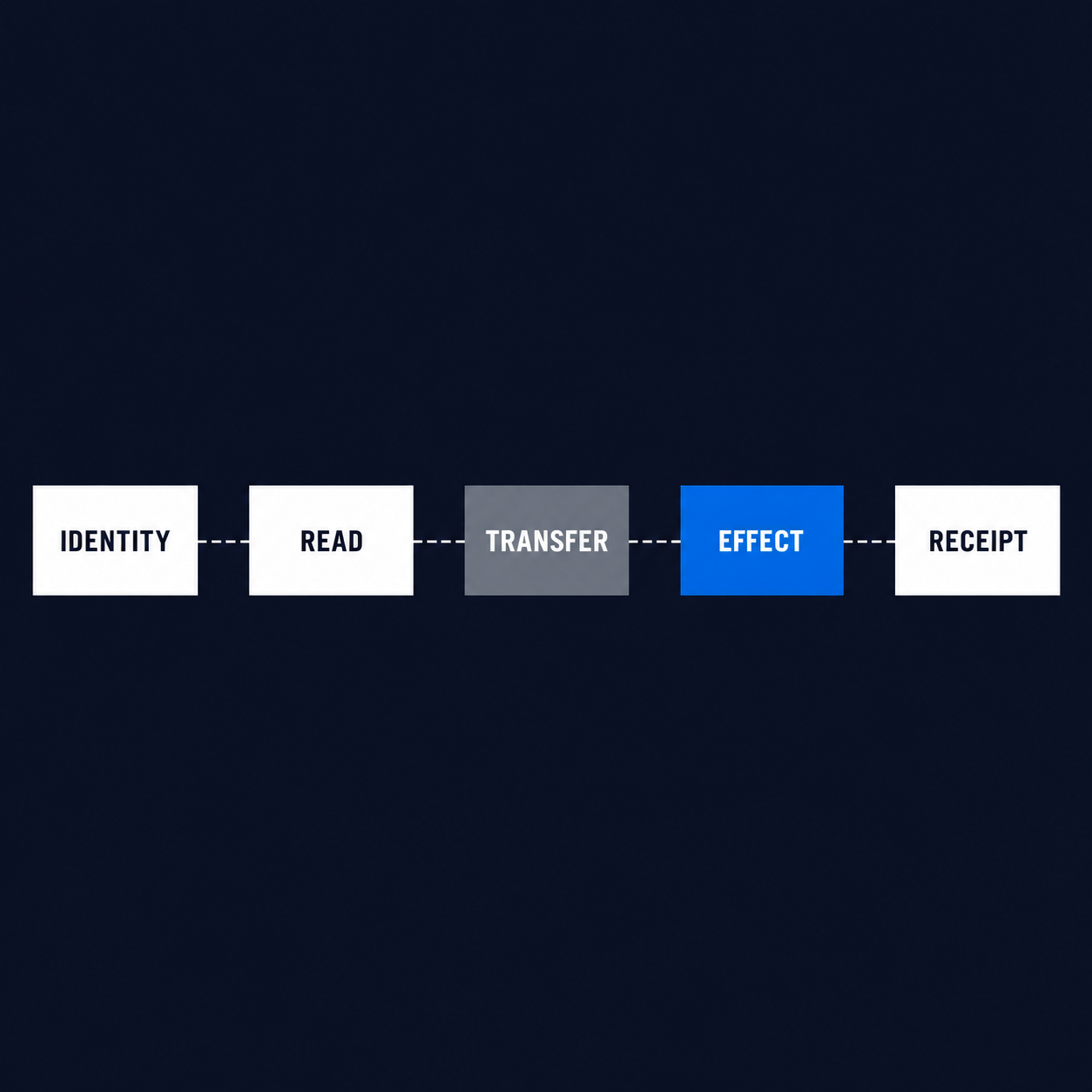
The map needs six questions for every surface:
| Field | Decision it records | Evidence required |
|---|---|---|
| Identity | Who is acting | authenticated user or dedicated agent identity |
| Read scope | What may enter context | named source, data class and policy owner |
| Transfer scope | Where that data may move | approved source, destination and data class |
| Write authority | Which effect may occur | named action, target and approval owner |
| Receipt | What proves the effect | downstream ID plus authoritative read-back |
| Stop owner | Who can interrupt or recover | accountable operator and revocation path |
This extends the workflow operating contract to an agent whose context crosses several products. The operating contract defines the job. The authority map defines where each part of that job may happen.
Start with identity, then enumerate the surfaces
Choose the acting identity before you configure skills or connectors. Google describes two materially different patterns.
The personal assistant acts with a user and their work context. The coworker agent receives its own Workspace account, email address, calendar, Drive and directory presence. Google says the coworker acts under its own identity and sees only the context people share with it.
Keep that separation in the authority map:
subject:
  kind: user | coworker
  id: required
  authenticated: required
  dedicated_identity: required_for_coworker
objective:
  name: required
  workflow_owner: required
surfaces:
  - name: drive
    mode: read
    data_scope: finance-approved-folder
    policy_owner: workspace-admin
  - name: docs
    mode: write
    action: draft.create
    effect_class: reversible
    approval_owner: finance-owner
The values above are a blank pattern, not a deployed policy.
A user-delegated task should preserve the initiating user's identity and the applicable resource permissions. A coworker task should preserve both the agent's dedicated identity and the human or team that assigned the objective. Do not collapse the two into a generic “Gemini” actor in logs.
Google's Agent Platform documentation provides useful platform primitives: unique agent identity, an Agent Registry, Agent Gateway, IAM and Model Armor policy enforcement, observability and audit logging. Use those controls. Still keep the customer-owned map, because a platform identity can be technically valid while the requested business action is outside the approved workflow.
Enumerate the surfaces literally. “Workspace” is too broad. “Drive read from the finance-approved folder” and “Docs create draft inside the review folder” are testable grants. “Can use Gmail” is not.
Separate read scope, transfer scope and write effects
The most important rule is simple: permission to read data at the source does not authorize moving it or acting on it elsewhere.
Suppose the agent may read a private planning document and prepare a draft status note. Three decisions still remain:
- May a summary leave Drive and enter a team Chat space?
- May the draft include names, financial values or customer details?
- May the agent post the message, or only prepare it for an owner?
Represent every cross-surface move explicitly:
transfers:
  - from: drive
    to: chat
    data_class: internal-summary
    allowed: true
    transform: redact-customer-identifiers
  - from: drive
    to: gmail
    data_class: source-document
    allowed: false
The data class matters because an approved destination may still reject raw source material. A Chat space might accept an internal summary while refusing attachments or customer-level records. The map should fail closed when the data class is absent.
Then classify the write:
- No effect: retrieval, calculation or draft held inside the run.
- Reversible effect: a draft, comment or calendar hold that a named owner can remove.
- Irreversible or consequential effect: external send, record mutation, publication, approval, payment or deletion.
Reversible does not mean harmless. It means the recovery path is known and tested. Every effectful write needs the exact action name, target scope, approval owner and receipt format. Consequential effects should also use an effect-bound human approval, where the reviewer sees the actual target and payload rather than approving a vague plan.
Do not accept a model transcript as the receipt. If the agent creates a Doc, record the authoritative document ID and read it back. If it sends a message, record the provider message ID and reconcile the destination. If a call times out, read state before retrying. Cross-surface work creates more places where “the tool returned” and “the intended outcome exists” can diverge.
Treat memory as retained authority context
Persistent context changes the boundary after the immediate task ends. Google describes session, semantic, procedural and episodic memory for Gemini. Those classes serve different jobs, so they should not share one retention decision.
- Session memory supports the current task, including work that continues after a device disconnects.
- Semantic memory holds structured knowledge learned from documents and interactions.
- Procedural memory preserves how work gets done, including skills.
- Episodic memory records prior activity.
For each enabled memory class, record an owner, allowed source classes, retention rule, reuse scope and deletion test. “The agent can remember” is a capability statement. It is not a retention policy.
The risky failure is authority laundering through memory. A user may legitimately share a sensitive fact for one approved task. If that fact later guides a different coworker agent, recipient or surface without a fresh authorization check, memory has widened the original grant.
Bind memory to provenance:
{
  "memory_class": "semantic",
  "source_surface": "drive",
  "source_resource": "required",
  "source_actor": "required",
  "allowed_reuse": ["variance-draft"],
  "retention_days": "organization_defined",
  "owner": "required",
  "purge_tested": false
}
The agent should not enter a bounded run with persistent memory when ownership, retention or purge behavior is unresolved. That is a review terminal, not a prompt-engineering problem.
Reconcile the admin layers, not just the interface
Google exposes relevant controls in more than one administration plane. The authority map should point to the effective policy and its owner, not merely capture a screenshot of the setting someone last viewed.
For Workspace, Google says administrators can disable Gemini access, restrict some or all Workspace data available to Gemini, restrict conversation sharing and govern Gemini Enterprise agents. Content owners also influence what the user and agent can reach through the underlying sharing model.
For Gemini Enterprise apps, Google's app-level IAM documentation contains an important precedence rule: a project-level Gemini Enterprise User grant can allow access to every app in the project regardless of app-level restrictions. Google recommends using the Restricted User role at project level and then granting access per app when granular isolation is required.
That produces a concrete admission check:
effective access = project grant
                + app grant
                + source-system permission
                + agent identity policy
                + destination policy
The expression is conceptual, not Google's formal IAM evaluation algorithm. Its purpose is to force a read of every contributing layer.
Test effective access with both positive and negative canaries. A permitted role should reach its approved app and source. A restricted role should fail to reach a second app, an excluded folder and a forbidden destination. Record the denial in the same evidence packet as the success. A green happy path does not prove isolation.
When multiple teams own the layers, name them separately. Workspace administration, Cloud IAM, an application owner and a security platform team may all contribute to one effective route. “IT owns it” is not enough to recover a mis-scoped agent.
Run the authority evaluator before the workflow
The reference evaluator for this article is dependency-free JavaScript. It classifies the map before any workflow execution.
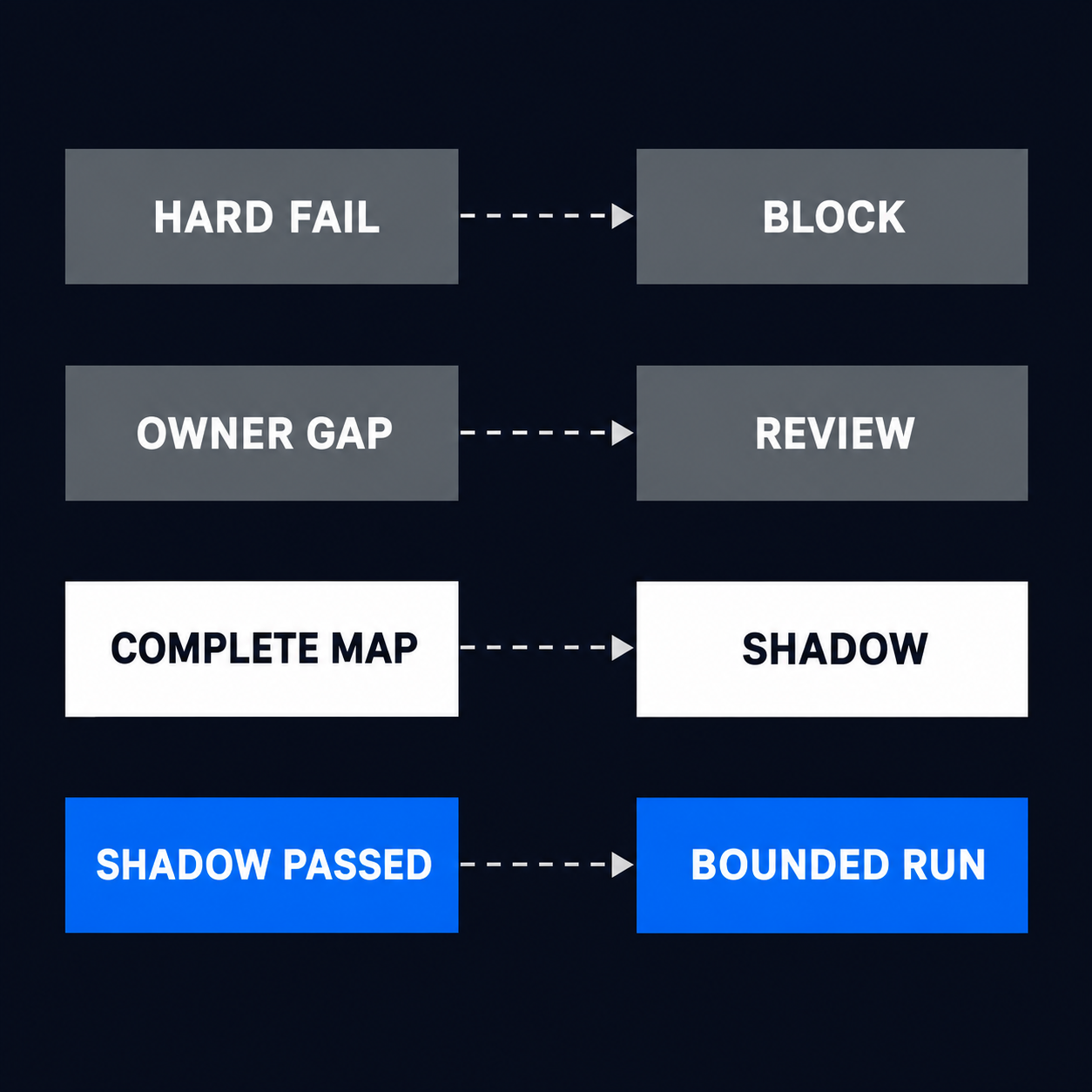
The hard failures are missing or unauthenticated identity, an empty or duplicate surface set, a disallowed surface, missing data scope, an unknown or denied transfer, no cost ceiling, no stop owner, or an audit record that cannot bind actor and policy version.
Review failures cover unresolved human authority: an effectful write without an approval owner, persistent memory without owner, retention or purge evidence, and a write without an outcome receipt.
The core decision order is:
if (hard.length) decision = "BLOCK";
else if (review.length) decision = "REVIEW_REQUIRED";
else if (stage === "bounded" && shadowPassed) {
  decision = "READY_FOR_BOUNDED_RUN";
} else {
  decision = "READY_FOR_SHADOW";
}
The retained test suite passed 24 checks. They exercise personal and coworker identity, missing objectives, empty and duplicate surfaces, denied sources, policy ownership, read scope, named write actions, approval ownership, unknown and denied transfers, memory ownership, retention and purge, cost ceiling, stop ownership, audit binding, effect receipts and a complete bounded write.
The test proves that the classifier follows its contract. It does not test Gemini, a Workspace tenant, a connector, an IAM deployment, model quality or a commercial outcome.
The terminals should remain visible to operators:
BLOCK: the request lacks technical admission evidence or crosses a denied boundary.REVIEW_REQUIRED: the route exists, but accountable authority or recovery evidence is unresolved.READY_FOR_SHADOW: the map is complete enough to observe the job without releasing effects.READY_FOR_BOUNDED_RUN: the shadow path passed and the one approved effect has an owner and receipt.
Release one bounded cross-surface job
Start with one job that is valuable enough to observe and narrow enough to stop. A good pilot might read an approved folder, prepare a draft in a review location and notify one internal owner. It should not begin with unrestricted inbox, Drive, calendar and external-send authority.
Use this release sequence:
Name the job and owner
Write one objective, one workflow owner and the evidence that marks the job complete.
Enumerate every surface
Record source, destination, mode, data class, policy owner and effective identity. Reject umbrella labels such as “Workspace access.”
Map every transfer and effect
Approve the data class that may cross each boundary. Name the action, target, approval owner, receipt and recovery path for every write.
Declare memory and cost
Choose which memory classes the job may use, who owns retained context, how it is removed and where the spending ceiling stops execution.
Run in shadow mode
Execute the plan without releasing the effect. Compare the proposed reads, transfers, targets and payloads with the owner-approved map.
Enable one reversible effect
Release the smallest write only after the shadow evidence passes. Read the downstream state back and retain the receipt.
Keep a kill path outside the agent loop. The stop owner should be able to revoke the agent identity, disable the connector or policy route and prevent queued work from resuming. A prompt telling the agent to stop is not a control.
The universal agent becomes useful when a team no longer has to re-brief every surface. It becomes governable when each surface can still refuse, review and prove its own part of the job.
Google Gemini agent FAQ
Can Google Gemini have agents?
Yes. Google now describes a universal work agent, personal and coworker patterns, and a broader enterprise platform for building and governing agents. For a business pilot, identify which agent type and acting identity own the job before enabling connectors.
How do you get access to Gemini Agent?
Access depends on the relevant Gemini Enterprise and Workspace configuration, licensing and administrator controls. Verify the service, identity and source-system permissions for the proposed pilot rather than treating interface access as deployment authority.
Does Gemini keep memory across Workspace apps?
Google says the universal agent carries the same memory, skills and controls across Gmail, Drive, Docs, Slides, Sheets, Chat and Calendar. The customer still needs to constrain which retained context may inform each destination and effect.
Is app-level IAM enough to isolate Gemini Enterprise apps?
Not when a broad project-level Gemini Enterprise User role remains. Google's documentation says that project-level grant takes precedence over app-level restriction, so granular access requires the documented restricted-user pattern plus per-app grants.